
Compare Documents Against Your Own Templates
Upload another party's draft and compare it against your own template to identify key changes, missing protections, new obligations, and legal risks.
Compare Documents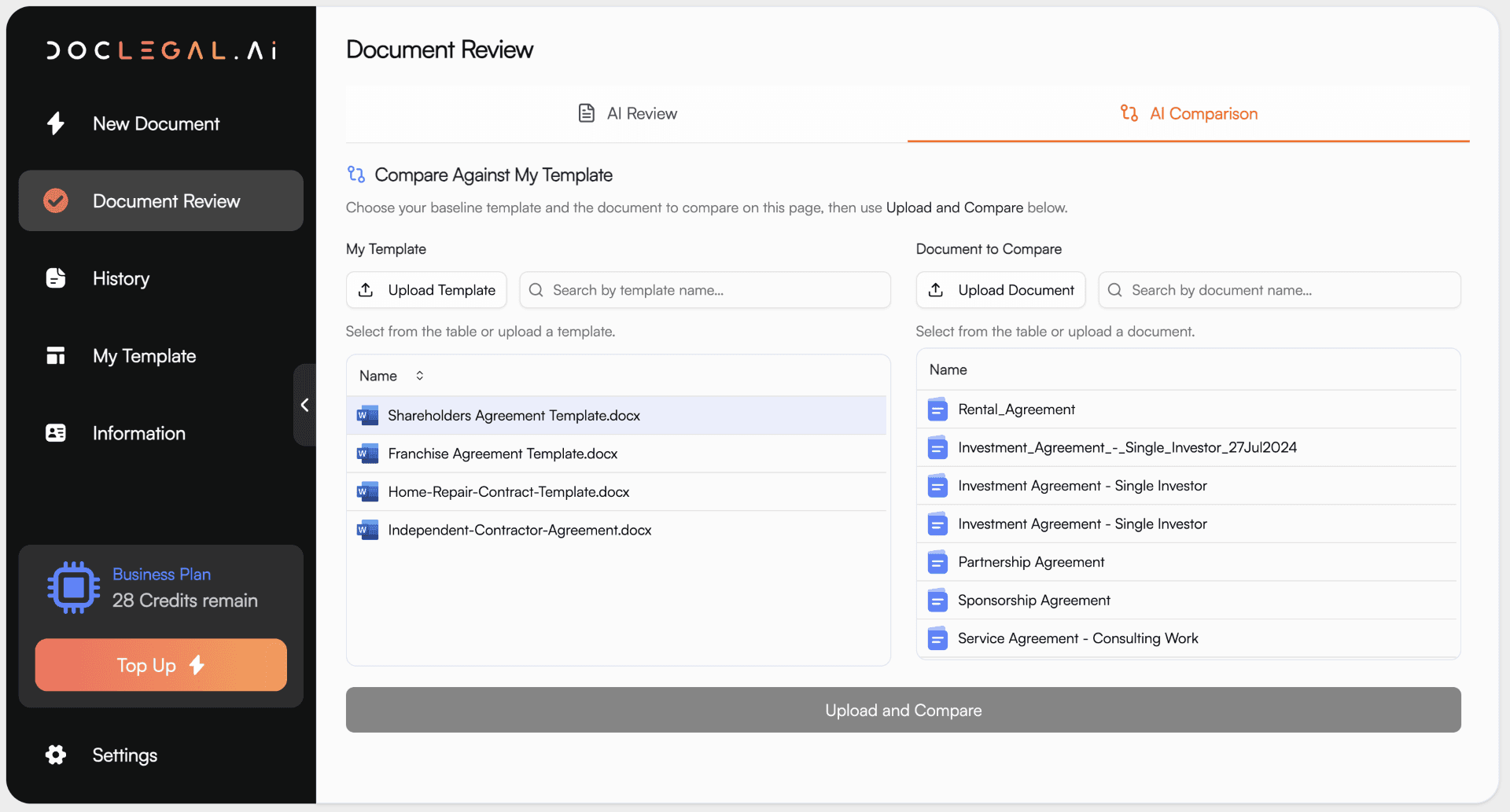
Review Counterparty Documents Against Your Preferred Position
DocLegal.Ai helps you compare a customer, supplier, counterparty, employee, landlord, tenant, borrower, or other party's document against your own preferred template.
Instead of reviewing a document in isolation, DocLegal.Ai uses your uploaded template as the baseline and highlights how the other party's draft departs from your preferred wording, structure, legal position, and commercial terms.
This helps businesses, legal teams, law firms, and professionals quickly identify what has changed, what protections may have been removed, what obligations may have been added, and what legal or commercial risks should be reviewed before signing.
What is "Compare Documents Against Your Own Templates"?
Compare Documents Against Your Own Templates is an AI-powered contract comparison and legal risk analysis tool.
You upload:
- Your own template — the baseline document representing your preferred position; and
- The other party's document — the draft, revised version, customer agreement, supplier contract, counterparty mark-up, or alternative form you want to review.
DocLegal.Ai then compares the two documents and identifies important differences, including added clauses, deleted clauses, weakened protections, new liabilities, changed commercial terms, inconsistent party names, signature block issues, missing schedules, and legal risks.
This feature is ideal when you receive a document from another party and want to understand how it differs from your usual template before you negotiate, approve, or sign.
Why Use DocLegal.Ai to Compare Against Your Own Template?

1. Compare Against Your Preferred Position
Your own template is often your best starting point. It reflects your preferred legal, commercial, operational, and risk position. DocLegal.Ai compares the other party's draft against your template so you can quickly see whether the new document is consistent with your standard position or whether it introduces material deviations.

2. Identify Key Changes Faster
Manually comparing contracts can be time-consuming, especially where changes are not shown in track changes. DocLegal.Ai helps identify added clauses, deleted clauses, amended wording, changed definitions, revised payment terms, changed termination rights, new indemnities, narrowed liability protections, weakened warranties, changed governing law or jurisdiction, missing schedules, and inconsistent signature blocks.
3. Highlight Legal and Commercial Risks
This feature does more than detect textual differences. It explains the possible legal and commercial effect of those changes. For example, DocLegal.Ai can help flag whether a change may increase liability, weaken payment protection, reduce termination rights, create new compliance obligations, or expose your business to additional risk.

4. Find Missing Protections
A counterparty draft may remove or weaken clauses from your original template. DocLegal.Ai can help identify missing protections, such as limitation of liability, indemnity protection, payment protection, termination rights, confidentiality obligations, intellectual property ownership, audit rights, non-solicitation provisions, dispute resolution procedures, governing law and jurisdiction clauses, notices provisions, and execution formalities.

5. Detect New Obligations and Liabilities
The other party's document may introduce new obligations that were not in your template. DocLegal.Ai helps identify new obligations, restrictions, warranties, undertakings, indemnities, conditions, approval rights, reporting duties, service levels, penalties, liquidated damages, or compliance requirements. This helps users focus on what has actually changed and what may need negotiation.
6. Check Party Names and Signature Blocks
Contract errors often arise from inconsistent party details. DocLegal.Ai can help check whether the party names, defined terms, addresses, company numbers, notices details, signatory names, titles, capacities, and signature blocks are consistent across the document. This is particularly useful where a document has been copied from an old template or revised by multiple parties.

7. Generate Practical Negotiation Points
After identifying the differences and risks, DocLegal.Ai can help produce practical negotiation points. These can be grouped by priority — must fix before signing, should negotiate, nice to improve, or can accept if commercially agreed. This makes the review output more useful for business users, legal teams, and external counsel.
Who Can Benefit from This Feature?
In-House Legal Teams
Quickly review customer, supplier, partner, or vendor documents against your internal templates and playbooks.
Law Firms
Compare client documents against firm precedents and identify material deviations, drafting issues, and negotiation points.
Startups and SMEs
Review contracts received from customers, suppliers, landlords, service providers, or investors before signing.
Sales and Commercial Teams
Understand changes to your standard customer agreements, order forms, service terms, statements of work, and renewal documents.
Procurement Teams
Compare supplier contracts against your preferred purchasing terms and identify risk areas.
HR Teams
Review employment contracts, consultancy agreements, contractor terms, and HR documents against your standard templates.
Property and Leasing Teams
Compare lease drafts, tenancy agreements, licence agreements, and renewal terms against your preferred forms.
How Does Compare Against Your Own Template Work?
Step 1: Upload Your Template
Upload your preferred template as the baseline document. This is the document that represents your standard position and preferred drafting.
Suggested UI copy: Upload your template. This will be used as the baseline for comparison.
Step 2: Upload the Other Party's Document
Upload the document you want to compare against your template. This may be a customer draft, supplier agreement, counterparty version, revised draft, or document received for review.
Suggested UI copy: Upload the other party's document. DocLegal.Ai will compare it against your template and identify key differences and risks.
Step 3: Select the Review Perspective
Choose whose perspective the document should be reviewed from. Examples:
- My company
- supplier
- customer
- employer
- employee
- landlord
- tenant
- lender
- borrower
- service provider
- buyer
- seller
- neutral review
- other
This helps DocLegal.Ai assess whether each change is favourable, neutral, or unfavourable from the correct perspective.
Step 4: Analyse Differences and Risks
DocLegal.Ai compares the two documents and produces a structured review covering:
- executive summary
- key differences
- legal and commercial risks
- removed or weakened protections
- new obligations
- party and signature inconsistencies
- drafting issues
- recommended negotiation points
Step 5: Review, Negotiate, or Revise
Use the results to decide whether the document is ready to sign, requires negotiation, or should be revised before approval. You can also ask DocLegal.Ai to suggest revised wording for selected clauses.
What Documents Can You Compare?
You can use this feature for a wide range of legal and business documents, including:
- service agreements
- customer contracts
- supplier agreements
- consultancy agreements
- non-disclosure agreements
- employment contracts
- contractor agreements
- lease agreements
- licence agreements
- distribution agreements
- agency agreements
- shareholder agreements
- loan agreements
- settlement agreements
- terms and conditions
- engagement letters
- statements of work
- order forms
- procurement terms
- data processing agreements
- IP assignment agreements
- board and shareholder documents
- commercial letters
- revised drafts or counterparty mark-ups
Key Benefits
- Baseline Comparison. Review the other party's draft against your own preferred template, not just as a standalone document.
- Legal Risk Analysis. Understand the legal and commercial effect of key differences.
- Missing Protection Detection. Identify clauses or protections from your template that have been removed, narrowed, or weakened.
- New Obligation Detection. Spot new duties, liabilities, indemnities, warranties, restrictions, and approval rights.
- Party and Signature Check. Find inconsistent party names, outdated template names, incorrect signatories, and signature block issues.
- Negotiation Support. Generate practical negotiation points based on the comparison.
- Faster Contract Review. Reduce time spent manually comparing drafts and identifying risk areas.
Compare Against Your Own Template vs Standard Document Review
| Feature | Standard Document Review | Compare Against Your Own Template |
|---|---|---|
| Reviews one document on its own | Yes | Yes |
| Uses your preferred template as baseline | No | Yes |
| Identifies added clauses | Limited | Yes |
| Identifies deleted clauses | Limited | Yes |
| Flags weakened protections | Limited | Yes |
| Highlights new obligations | Yes | Yes |
| Compares legal position against your standard form | No | Yes |
| Checks party and signature consistency | Yes | Yes |
| Produces negotiation points | Yes | Stronger |
| Best for counterparty drafts | Useful | Ideal |
Example Use Cases
Customer Sends Their Own Contract
You have your own standard service agreement, but the customer sends their own form. Upload both documents and compare the customer's version against your template. DocLegal.Ai can highlight missing payment protections, broader liability exposure, unusual termination rights, and unfavourable governing law provisions.
Supplier Amends Your Standard Terms
A supplier returns a revised version of your procurement terms. Upload your original template and the supplier's version. DocLegal.Ai can identify deleted protections, added indemnities, changed delivery obligations, and revised payment or termination terms.
Landlord or Tenant Sends a Lease Draft
Compare a lease or tenancy agreement against your preferred form. DocLegal.Ai can flag differences in rent, deposit, repair obligations, reinstatement, break clauses, renewal rights, permitted use, assignment, and termination provisions.
Employer Reviews an Employment Contract
Compare an employee, executive, consultant, or contractor document against your standard HR template. DocLegal.Ai can help identify changes to probation, notice period, confidentiality, IP ownership, restrictive covenants, bonus entitlement, termination rights, and post-employment obligations.
Law Firm Reviews Client or Counterparty Draft
Upload the firm's preferred precedent and the counterparty draft. DocLegal.Ai can produce a structured review identifying deviations, legal risks, drafting issues, and negotiation points for the lawyer to consider.
What the Review Can Highlight
Key Differences
DocLegal.Ai can summarise the most important differences between your template and the other party's document.
Legal and Commercial Risks
The review can explain whether a change affects rights, obligations, remedies, liability, payment, termination, dispute resolution, or enforceability.
Removed or Weakened Protections
The review can identify clauses from your template that have been deleted, narrowed, weakened, qualified, or made conditional.
Added Clauses and New Obligations
The review can highlight new liabilities, indemnities, warranties, undertakings, procedures, restrictions, conditions, or compliance obligations.
Drafting and Consistency Issues
The review can flag undefined terms, inconsistent terminology, broken cross-references, missing schedules, incorrect numbering, incomplete placeholders, and duplicated clauses.
Party and Execution Issues
The review can check whether party names, company details, addresses, signatories, titles, witness lines, and signature blocks are consistent.
Suggested Output Structure
The comparison report can be structured as follows:
- Executive Summary — Overall consistency with your template and the most important issues.
- Key Differences Table — Clause-by-clause summary of important differences.
- Legal Risk Analysis — Explanation of legal and commercial consequences.
- Missing Protections — Protections from your template that were removed or weakened.
- New Obligations — Additional obligations, liabilities, warranties, indemnities, or restrictions.
- Party and Signature Check — Inconsistencies in party names, defined terms, signatory names, addresses, and execution blocks.
- Drafting Issues — Numbering, cross-reference, undefined term, placeholder, schedule, and formatting issues.
- Negotiation Points — Practical points ranked by urgency.
Recommended Risk Labels
Use simple labels to help users prioritise:
| Risk Level | Meaning |
|---|---|
| High Risk | May materially affect liability, payment, termination, ownership, enforceability, dispute resolution, or signing validity. |
| Medium Risk | Should be reviewed or negotiated before signing. |
| Low Risk | Minor drafting, formatting, clarification, or operational issue. |
| No Material Risk | Difference noted, but no obvious material legal or commercial impact. |
Suggested issue labels:
- Added Clause
- Deleted Clause
- Weakened Protection
- Missing Protection
- New Obligation
- New Liability
- Party Inconsistency
- Signature Issue
- Undefined Term
- Cross-Reference Issue
- Missing Schedule
- Commercial Change
- Legal Risk
- Negotiation Point
Why This Feature Matters
Contract review is not only about whether a document looks acceptable. It is often about whether the document departs from your preferred legal and commercial position.
A document may look similar to your standard template but contain important changes that shift risk, reduce protections, impose new obligations, or create inconsistencies.
Compare Documents Against Your Own Templates helps users focus on what matters most: what changed, why it matters, and what should be done before signing.
Best Practices When Comparing Documents
- Use a Clean Baseline Template — Upload the version that best represents your preferred position.
- Upload the Full Counterparty Document — Avoid partial extracts where possible, because important changes may appear in schedules, annexures, signature blocks, or boilerplate clauses.
- Choose the Correct Review Perspective — The same change may be favourable to one party but risky for another. Select the reviewing party carefully.
- Review High-Risk Items First — Focus first on liability, indemnity, payment, termination, IP, confidentiality, governing law, dispute resolution, and execution issues.
- Do Not Rely Only on Textual Difference — A minor wording change can have major legal effect, while a large formatting change may have no material legal impact. The review should consider legal effect, not just visible edits.
Ready to Simplify Your Legal Work?
Visit us at DocLegal.Ai to explore how our AI-powered legal tools can revolutionize your approach to legal tasks.
Try DocLegal.Ai today